Serverless AWS Lambda Layer
Introduction to AWS Lambda Layers
Info
AWS Lambda layers provide a convenient way to package libraries, custom runtimes, or other function dependencies separately from your function code. Layers promote code sharing and separation of concerns so that you can iterate on your function code more quickly.
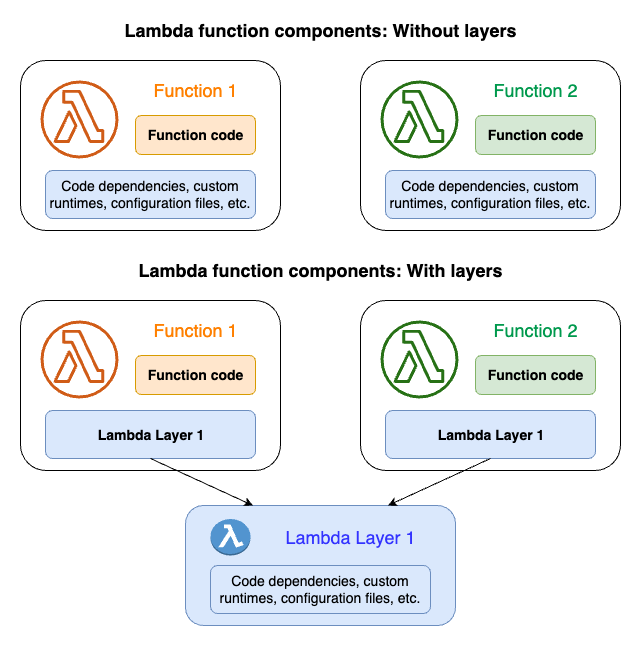 Ref: AWS Lambda Layers
Benefits
- Code Reusability: Share common dependencies across multiple Lambda functions
- Smaller Deployment Packages: Function code packages are smaller without bundled dependencies
- Faster Deployments: Only update layers when dependencies change
- Version Management: Layer versions are immutable and can be referenced by multiple functions
Creating Lambda Layers with Serverless Framework
Manual Package Creation
To create a Lambda layer manually, follow these steps:
# Set environment variables
export PYTHON_VERSION=3.11
export PYTHON_PACKAGE='pandas'

# Create layer structure
mkdir -p "layer/python/lib/python${PYTHON_VERSION}/site-packages"
pip3 install $PYTHON_PACKAGE -t "layer/python/lib/python${PYTHON_VERSION}/site-packages/"

# Package layer
cd layer/
zip -r ${PYTHON_PACKAGE}.zip *
Automated Package Generation
Use the provided script to generate multiple package layers:
File generate-packages.sh
#!/bin/bash

set -e

main() {
  arr_packages=( "mysql-connector-python" "numpy" "pandas" "PyMySQL" "requests" "SQLAlchemy" "marshmallow" "pytz")
  arr_python_versions=( "3.11" )

  # prepare-directory-for-storing-layer-zip-file
  mkdir -p layers

  for version in "${arr_python_versions[@]}"; do
      layer_path="python/lib/python${version}/site-packages"

      for package in "${arr_packages[@]}"; do
          # cleanup-for-fetch-installation
          rm -rf ./python && mkdir -p $layer_path

          pip3 install $package -t $layer_path
          python3 -c "import shutil;shutil.make_archive('${version}-${package}','zip',root_dir='.', base_dir='python')"

          # copy-layer-zip-file-layer-folder
          mv ${version}-${package}.zip layers/
      done # # end-for-arr_packages
  done # end-for-arr_python_versions
}

main "$@"
This script creates layers for the following Python packages (or any packages you specify):
- mysql-connector-python
- numpy
- pandas
- PyMySQL
- requests
- SQLAlchemy
- marshmallow
- pytz
Serverless Configuration
Layer Definition
Here's how to define Lambda layers in your serverless.yml:
service: create-lambda-layers

provider:
  name: aws
  region: ap-southeast-1
  deploymentBucket:
    name: btin-serverless-aps1-share-bucket
    serverSideEncryption: AES256

package:
  individually: true

layers:
  btin-python311-utils:
    path: layers/utils
    package:
      artifact: layers/utils/utils.zip
    compatibleRuntimes:
      - python3.11
    compatibleArchitectures:
      - x86_64
    licenseInfo: GPLv3
    description: "btin-utils"

  btin-python311-mysql-connector-python:
    package:
      artifact: 3.11-mysql-connector-python.zip
    compatibleRuntimes:
      - python3.11
    description: "btin-mysql-connector-python"

  btin-python311-requests:
    package:
      artifact: 3.11-requests.zip
    compatibleRuntimes:
      - python3.11
    description: "btin-requests"

  btin-python311-PyMySQL:
    package:
      artifact: 3.11-PyMySQL.zip
    compatibleRuntimes:
      - python3.11
    description: "btin-pymysql"

  btin-python311-SQLAlchemy:
    package:
      artifact: 3.11-SQLAlchemy.zip
    compatibleRuntimes:
      - python3.11
    description: "btin-sqlalchemy"

  btin-python311-numpy:
    package:
      artifact: 3.11-numpy.zip
    compatibleRuntimes:
      - python3.11
    description: "btin-numpy"

  btin-python311-pandas:
    package:
      artifact: 3.11-pandas.zip
    compatibleRuntimes:
      - python3.11
    description: "btin-pandas"

  btin-python311-marshmallow:
    package:
      artifact: 3.11-marshmallow.zip
    compatibleRuntimes:
      - python3.11
    description: "btin-marshmallow"

  btin-python311-pytz:
    package:
      artifact: 3.11-pytz.zip
    compatibleRuntimes:
      - python3.11
    description: "btin-pytz"

plugins:
  - serverless-deployment-bucket
  - serverless-prune-plugin

custom:
  prune:
    automatic: true
    number: 3
  deploymentBucket:
    versioning: false
    accelerate: true
    blockPublicAccess: true
Using Layers in Functions
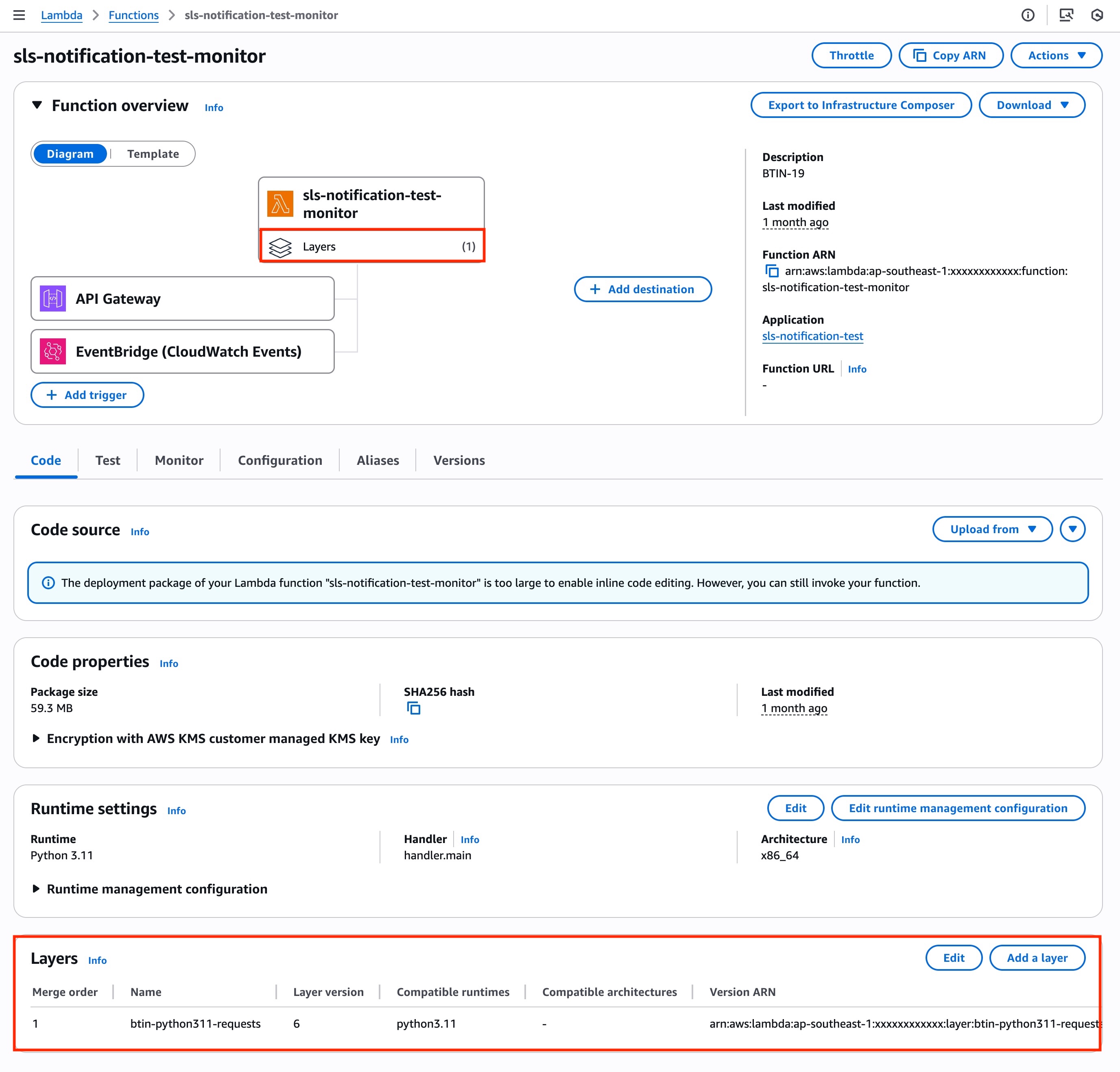
Reference layers in your Lambda functions:
functions:
  monitoring:
    handler: handler.monitoring_handler
    layers:
      - "${cf:create-lambda-layers-ops.BtinDashpython311DashutilsLambdaLayerQualifiedArn}"
      - "${cf:create-lambda-layers-ops.BtinDashpython311DashpandasLambdaLayerQualifiedArn}"
    timeout: 60
    description: "CloudWatch monitoring function"
    events:
      - sns:
          arn: !Ref CloudWatchAlarmTopic
Layer Naming Convention
Standard Format
Our Lambda layers follow this naming convention:
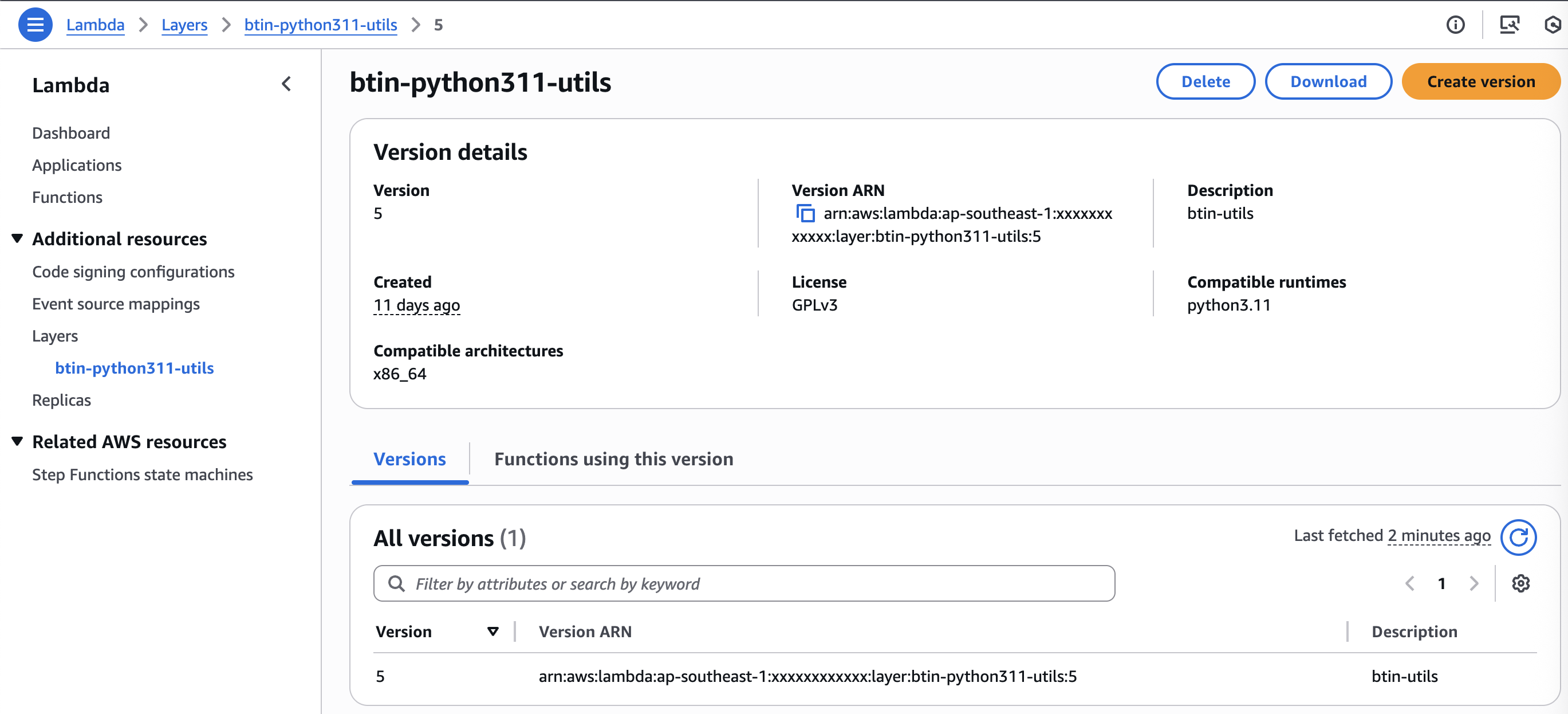
btin-python311-<package-name>
Examples:
btin-python311-pandasbtin-python311-requestsbtin-python311-utils
Package Files
ZIP files are named using:
<python-version>-<package-name>.zip
Examples:
3.11-pandas.zip3.11-requests.ziputils.zip
Utility Layer Components
CloudWatch Alerting Functions
The utility layer includes functions for CloudWatch alarm processing:
# Parse SNS messages from CloudWatch alarms
def parse_sns_message(event):
    sns_message = json.loads(event['Records'][0]['Sns']['Message'])
    # Process alarm data...

# Send alerts to Microsoft Teams
def alert_chat(message):
    # Send webhook notification...

# Send email alerts via AWS SES
def alert_email(content_html, message, type):
    # Send email notification...
Usage in Lambda Functions
import json
import requests
from utils import parse_sns_message, alert_chat, alert_email

def lambda_handler(event, context):
    # Parse CloudWatch alarm from SNS
    message = parse_sns_message(event)

    if message:
        # Send chat notification
        alert_chat(message)

        # Send email alert
        content_html = generate_email_html(message, 'cloudwatch')
        alert_email(content_html, message, 'cloudwatch')

    return {'statusCode': 200}
Deployment and Management
Deploy Layers
Deploy all layers to AWS:
serverless deploy --stage <your-stage>
AWS Configuration
- Region: ap-southeast-1
- Deployment Bucket: btin-serverless-aps1-share-bucket
- Runtime: Python 3.11
- Architecture: x86_64
- License: GPLv3
Layer Versioning
Layer versions are immutable. When you update a layer, AWS creates a new version. Update your function configurations to reference the new layer version.
Best Practices
Layer Organization
- Keep layers focused on specific functionality
- Separate third-party packages from custom utilities
- Use consistent naming conventions
- Document layer contents and versions
Performance Considerations
- Lambda cold starts increase with layer size
- Optimize layer contents to include only necessary files
- Consider layer loading order for dependencies
Reference
For more details, visit the AWS Lambda Layers Documentation.